What you need to know:
Starting March 31st, 2026, your DUO Mobile App must be version 4.85.0 or higher in order to sign in to your university accounts.
This does not apply to Duo hard tokens
What you need to do:
The easiest way to make sure you're ready is to simply update the Duo Mobile app on your device:
- Go to your DUO Mobile App.
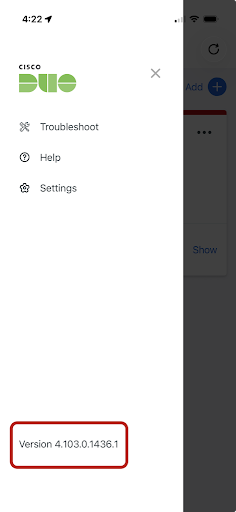
- Click the hamburger menu icon in the top left
- The number at the bottom left corner is the version number. Check if the version is higher than version 4.85.0
- Note: Software versions count whole numbers. Version 4.106.0 is newer than 4.85.0 -- think "106" vs "85," not decimals.
- If the application version is lower than 4.85.0, please open the App Store (for iOS devices) or Google Play Store (for Android OS devices) and search for "DUO Mobile."
- If you see an "Update" button, please update the application.
- If you only see "Open," and your mobile device's OS is current (see below), no update is needed.

Additional note on mobile device OS version requirements:
Please be aware that your mobile device's operating system (OS) must be up-to-date to run Duo Mobile 4.85.0 or newer. For an iOS device (iPhones/iPads), iOS version 16 or higher is required. For an Android OS device, version 11 or higher is required.
Please ensure your mobile device's OS is up to date before attempting to update your Duo Mobile App.
This DUO Mobile App update must be completed prior to March 31st, 2026 to avoid any login issues.
Why this update matters:
This update includes important security improvements that ensure your account and personal information remain secure.
Need help?
Students - Please contact the Student Help Desk by calling (805) 893-4357 or by emailing its-student.help@ucsb.edu.
Staff and Faculty - Please contact your local IT support team or the ITS Service Desk at (805) 893-5000.
We're here to help!
Unable to update your device's OS?
Your choices are:
- Replace the device with one that supports the latest OS version.
- Request a DUO hard token. Tokens will be given to individuals who do not have any other means to authenticate with DUO. Please plan around processing times accordingly.
- For individuals who are on campus, it can take approximately 1-2 days for processing.
- For individuals who are remote, it can take approximately 1 week or more.